

처음부터 차근차근
Xcode 실행 중 Simulator 계속 검은 화면만 뜨는 error 본문

Xcode에서 실행 버튼을 눌렀는데 갑자기 Simulator화면이 까맣게만 보였다.
이 error가 생기는 이유는 story board entry point 삭제되었기 때문이다.
Xcode에서 story board의 entry point가 삭제됬을 때 계속 검은 화면만 뜬다.
해결 방법
삭제된 entry point를 다시 만든다.
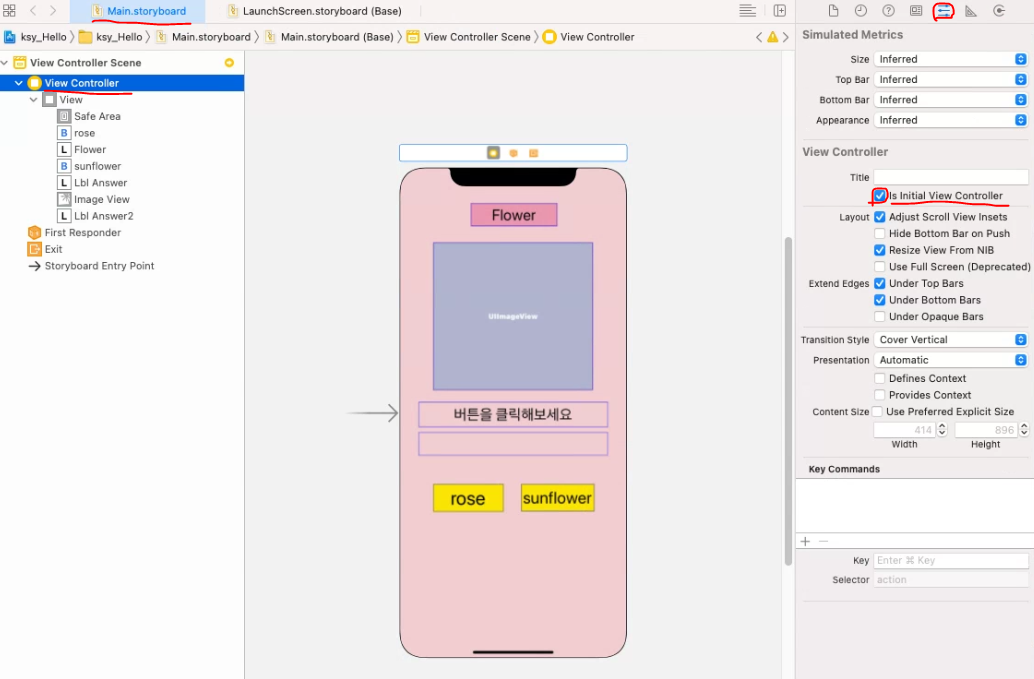
Main.storyboard -> View Controller로 가서 표시한 부분을 체크해주면 다시 entry point가 생긴다.
'Error&Warning' 카테고리의 다른 글
| Codeigniter session database timestamp에 0이 들어가는 이유 (0) | 2021.12.02 |
|---|---|
| Unable to access an error message corresponding to your field name (0) | 2021.11.19 |
| Xcode 실행 버튼 눌렀을 때 error (0) | 2021.11.17 |
| VSCode sftp 연결 Error : No such file (0) | 2021.11.09 |
| [warning] git - LF will be replaced by CRLF (0) | 2021.09.24 |
'Error&Warning' Related Articles
more


Comments